CleanArchSharp: Clean architecture template (.NET))
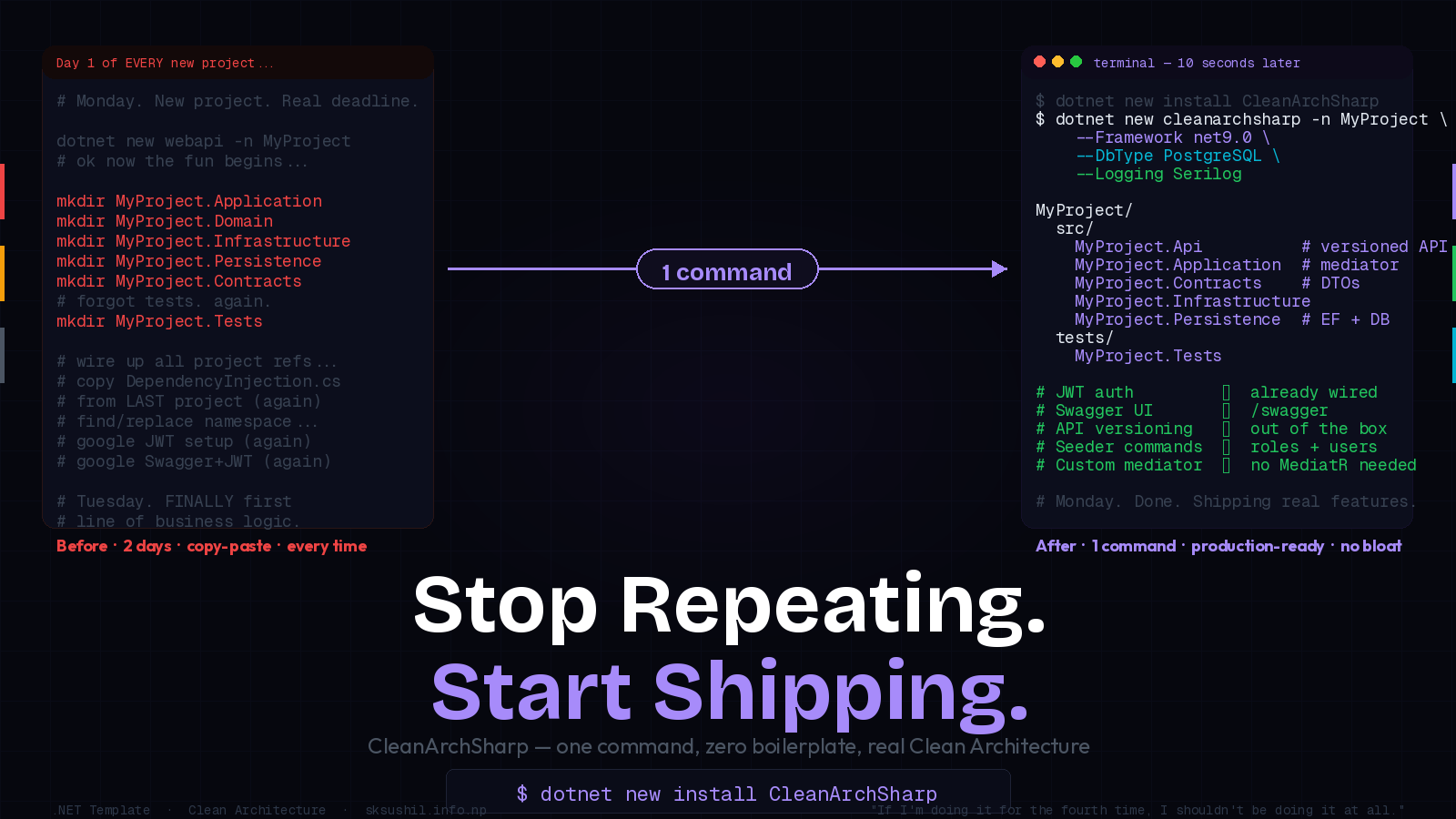
I Was Tired of Building the Same House Foundation Every Time. So I Poured It Once.
Let me paint you a picture.
It's Monday morning. You have a new project. A real one — a client is waiting, a deadline exists, and you're actually excited about the business problem you're about to solve.
You open your terminal, type dotnet new webapi -n MyAwesomeProject, and then…
The ritual begins.
The Setup Ritual Nobody Talks About
You know exactly what I mean.
Day 1 — Morning
├── Create the solution
├── Add Application project
├── Add Domain project
├── Add Infrastructure project
├── Add Persistence project
├── Add Contracts project
├── Wire up all the project references
└── Realize you forgot the Tests projectDay 1 — Afternoon
├── Set up dependency injection
├── Add EF Core
├── Configure the DbContext
├── Add JWT authentication
├── Add refresh token logic
├── Wire up Swagger
└── Google "how to configure Swagger with JWT" for the 14th timeDay 2 — Morning
├── Add API versioning
├── Set up Serilog (or argue with yourself about logging)
├── Create seed commands for roles and users
├── Add global authorization filters
└── Finally — FINALLY — write your first line of actual business logicTwo days. Two full days before you've solved a single business problem. Two days of copy-pasting from your last project (which was copy-pasted from the one before that).
I've done this setup so many times I could do it in my sleep. And that's exactly the problem — work you can do in your sleep should be automated.
The Last Straw
I was on my fourth project in three months. Different clients. Different domains. Same foundation.
I opened my previous project, started copying folder structures, and caught myself
literally copy-pasting a DependencyInjection.cs file and doing a find-replace on
the namespace.
That was the moment.
"If I'm doing the same thing for the fourth time, I shouldn't be doing it at all."
So I stopped. Closed everything. And built CleanArchSharp.
What CleanArchSharp Actually Is
It's not a library. It's not a framework. There's nothing to import, nothing to update, nothing that adds weight to your project.
It's a dotnet new template — like the built-in dotnet new webapi, but instead of
giving you a toy with a single WeatherForecast.cs, it gives you a production-ready
Clean Architecture solution with everything already wired up.
# Install once. Use forever.
dotnet new install CleanArchSharp
<h1>Start any new project in seconds</h1>
dotnet new cleanarchsharp -n MyProject
That's it. That's the whole API.
What You Get in One Command
MyProject/
├── src/
│   ├── MyProject.Api           ← Minimal API, versioned, Swagger ready
│   ├── MyProject.Application   ← Commands, queries, custom mediator
│   ├── MyProject.Contracts     ← DTOs, request/response models
│   ├── MyProject.Infrastructure← Email, external services
│   └── MyProject.Persistence   ← EF Core, DbContext, migrations
└── tests/
    └── MyProject.Tests
Every layer knows about the right layers. Nothing is wired wrong. Dependencies flow inward, exactly as Clean Architecture demands — and you didn't have to think about it for a second.
---
Pick Your Stack at Generation Time
This is the part that made me actually happy to start new projects again:
dotnet new cleanarchsharp -n MyProject \
  --Framework net9.0 \
  --DbType PostgreSQL \
  --Logging Serilog
No Serilog? Pass --Logging None. Using MySQL instead of Postgres? --DbType MySQL.
The template adapts. You don't edit config files afterwards. The right packages,
the right connection string format, the right EF provider — all selected before the
first file is written.
What's Already Wired For You
JWT Auth — Done
Access tokens. Refresh tokens. Email confirmation with Gmail. Global permission filter on endpoints. Role-based access. All of it. Already there.
API Versioning — Done
Your routes are versioned from day one. Not bolted on later when a client asks for v2 and you realize your entire API is unversioned spaghetti.
Swagger — Done
Opens at /swagger. JWT bearer auth configured in the UI. You can test your protected
endpoints immediately without Postman.
Custom Mediator — Done (and No MediatR)
CleanArchSharp ships with its own lightweight custom mediator for commands,
queries, and events. No MediatR dependency. No extra package. No license to worry
about. Just the pattern, implemented cleanly.
Seeder Commands — Done
# Seed roles (SuperAdmin, Admin, User) + all resources
dotnet run seed role
<h1>Create a real user</h1>
dotnet run seed user admin@myproject.com Admin@123 "Admin User" Admin
That first deploy where you need test data? Handled. That onboarding where a new dev needs to seed their local DB? One command.
It Works Where You Work
CleanArchSharp shows up in your IDE's New Project dialog — not just the terminal.
Visual Studio: File → New → Project → search "CleanArchSharp" → done.
JetBrains Rider: New Solution → search "CleanArchSharp" → done.
No terminal required if that's not your thing. The template is a first-class citizen in both IDEs.
The "No Extra Things" Principle
Here's what CleanArchSharp is deliberately not:
Not a framework that your code depends on
Not a library you'll see in your .csproj at runtime
Not a set of base classes you inherit from forever
Not something that gets in your way when requirements change
Once the project is generated, CleanArchSharp is gone. Your code is your code.
You own the structure. You own every file. There's no CleanArchSharp. namespace
anywhere in your solution after generation.
It's scaffolding — not a cage.
"The template does its job at project creation, then disappears completely.
What's left is your project, structured properly, ready for your business logic."*
The Quick Start
# 1. Install the template
dotnet new install CleanArchSharp
<h1>2. Generate your project</h1>
dotnet new cleanarchsharp -n YourProject --Framework net9.0 --DbType PostgreSQL --Logging Serilog
<h1>3. Restore</h1>
dotnet restore
<h1>4. Apply migrations</h1>
cd src/YourProject.Api
dotnet ef database update
<h1>5. Run</h1>
dotnet run
<h1>Swagger is waiting at https://localhost:<port>/swagger
Seed roles and users only after the database exists and the API starts successfully.
Rundotnet run seed rolefirst, then create users withdotnet run seed user.
dotnet new install CleanArchSharp📦 NuGet: CleanArchSharp 💻 GitHub: shoesheill/CleanArchSharp
Tags
Subscribe to Newsletter
Get notified about new articles
Related Articles
The Bridge That Never Breaks — gRPC Streaming in a Hybrid Offline World
How gRPC streaming became the backbone of a hybrid system connecting cloud services with multiple of...
Integrating eSewa, Khalti & Dynamic FonePay QR in .NET
Complete guide to integrating eSewa, Khalti and FonePay Dynamic QR in .NET with code examples....